How to start a smart home without wasting money
Start with one problem, match the app you already use, and buy a plug, a sensor and (only if needed) a hub. What renters and owners should buy first.
Updated 2026-11-27
Start with a problem, not a product
The smart homes that get used are the ones built to fix something specific. Before you buy anything, write down one or two annoyances you want gone. Typical good first problems:
- A lamp or fan you want on a schedule, or switched off when you forget.
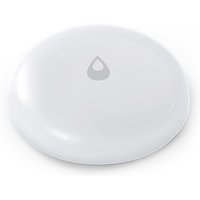
- Knowing if a door or window was left open, or if water is leaking under a sink.
- A room that gets too hot, cold or humid when you are not there.
- A device with an old remote or a push button that you want to control from your phone.
Each of those maps to one cheap device. A problem like "make the house smart" maps to a pile of gadgets and five different apps.
Pick the app you already live in
Your phone and any speakers or displays you own decide which smart home app is easiest. The four big ones are Apple Home, Google Home, Amazon Alexa and Samsung SmartThings. All four support Matter, the shared standard that lets one device work with several apps, according to the Connectivity Standards Alliance, which runs it.
- Apple Home suits iPhone households. Apple says a home hub (HomePod, HomePod mini or Apple TV) is what lets you control accessories away from home, share access and run automations (Apple Support).
- Google Home needs a Matter-enabled Google hub such as a Nest speaker or display for Matter devices (Google Nest Help).
- Alexa uses a compatible Echo as the controller; you add Matter devices in the Alexa app (Amazon developer docs).
- SmartThings uses your phone to set up Matter devices and a SmartThings or Aeotec hub to control them (SmartThings Support).
If you already own an Echo, a Nest speaker or a HomePod, start in that system. You can add a second app later; Apple, for example, lets an accessory already set up in another Matter app be added to the Home app too (Apple Support).
Renters vs owners
Renters should stick to things that plug in, stick on or sit on a shelf, so nothing changes when you move out. Plug-in smart plugs, battery sensors, and stick-on button pushers all fit. The SwitchBot Bot, for example, attaches next to a rocker switch or button with an adhesive pad and physically presses it, so you can automate a coffee maker or a wall switch without wiring.
Owners have more options: in-wall smart outlets and switches look tidier and free up the socket. They also mean electrical work. Lumary's in-wall Wi-Fi outlet, for example, needs hot, neutral and ground wires and an outlet box deeper than two inches (Lumary product page). If you are not sure your boxes have a neutral wire, or you are not comfortable working on house wiring, get an electrician.
The first three devices that pay off
1. A smart plug
It is the cheapest way to put a lamp, fan or coffee maker on a schedule or voice control. Check two things first: the plug's load rating against what you will plug in, and the Wi-Fi band. SwitchBot's Plug Mini is rated for 15 A maximum (SwitchBot Support) and, like most Wi-Fi smart plugs, connects only on 2.4 GHz; SwitchBot says its devices do not support 5 GHz Wi-Fi (SwitchBot Support). Some things should never go on a smart plug; see what not to put on a smart plug.
2. A sensor
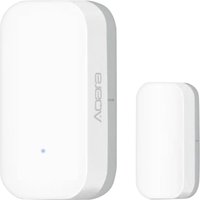
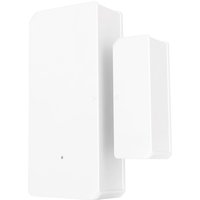
A door, motion, leak or temperature sensor is what turns a remote control into automation: the light comes on when a door opens, or your phone buzzes when a pipe leaks. Before you buy, check what the sensor needs to send you alerts away from home. SwitchBot's Contact Sensor needs a SwitchBot hub for push notifications and for automations with other devices (SwitchBot), and its Motion Sensor needs a hub for remote alerts and Alexa (SwitchBot). Aqara says an Aqara hub is required for its door and window sensor (Aqara).
3. A hub, only if your devices need one
Wi-Fi devices such as smart plugs usually talk to your router directly. Lumary, for example, lists its Wi-Fi outlets as needing no hub (Lumary). Devices that use Bluetooth, Zigbee or Thread need something that bridges them to your network:
- Bluetooth devices work only within Bluetooth range of your phone. SwitchBot explains that its Meter on its own is limited to Bluetooth range, and a SwitchBot hub relays its readings to the internet over your Wi-Fi (SwitchBot Support).
- Zigbee devices, including most Aqara sensors, need a Zigbee hub from the same brand or one that supports Zigbee.
- Thread devices need a Thread border router, which is built into some HomePods, Apple TVs, Nest hubs, Echos and SmartThings hubs. See Matter, Thread, Zigbee and Wi-Fi explained.
What goes wrong for beginners
- Too many apps. Every brand has its own app. Keep it to one or two brands at first, and use Matter or your main app to pull them together.
- 5 GHz-only Wi-Fi setups. Most cheap smart devices need 2.4 GHz. If your router merges both bands under one name and setup fails, that is a common reason.
- Forgetting the hub. A cheap sensor that needs a hub is not cheap if you do not own the hub.
- Skipping security. Every new device is another login. Change default passwords and keep firmware updated; see how to secure your smart home.
Before you add more, it helps to know the running costs, from subscriptions to batteries: the hidden costs of a smart home and what to check before you buy.